Articles
- W3Schools HTML Tables: https://www.w3schools.com/html/html_tables.asp
- MDN HTML Table Basics: https://developer.mozilla.org/en-US/docs/Learn/HTML/Tables/Basics
We can change, if we're inclined.
That's the way that we are designed.
Out here in the middle of our little America.
This assignment is designed for multiple CIS classes and shares a core theme. Each class has its own specific goal, instructions, and deliverables, tailored to the course level. Please carefully review the section labeled for your class to understand your unique requirements.
Demonstrate ability to create HTML tables with basic styling for improved usability
Follow along with the demonstration video in the Shared Resources to create a version of the hours of operation table for the Deschutes County Public Library.
Your hobby website needs two pages that each feature a large-scale table or grid for displaying content.
href="#" is fine.The images below are from previous students' work on this assignment where they were creating an event calendar for a small eatery website. These are good examples inspired by tables they found on live websites.
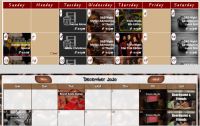
Make sure your web pages are published and your table/grid layouts work and display properly for desktop. Create a hyperlink to your library hours page from your index/home. Create hyperlinks to each of your hobby pages (with tables) from your hobby home page. Your hobby home page should alredy be linked from your index/home page.
Submit your URL within Canvas. This will confirm to me that you've finished the assignment and it's ready to check.
Add interactivity to a homepage mockup.
Add scripts for interactions, such as a carousel or menu animations.
JavaScript files with documentation on functionality.
Refine homepage design with a focus on UX and backend requirements.
Enhance the CIS195 mockup with UX adjustments, accessibility features, and behind-the-scenes details (e.g., robots.txt).
Revised HTML, CSS, JavaScript, and additional UX documentation.